
How you can use ABAP CDS, OData V4, ABAP Developer Tools (ADT) and SAP Fiori Elements to create a Purchase Order item DIFOT report and give procurement teams instant visibility into supplier delivery performance.
Developer Extensibility
SAP S/4HANA Public Cloud
DIFOT
Delivered In Full On Time
What is “DIFOT”?
DIFOT stands for Delivered In Full, On Time. Essentially, it is a supply chain performance metric that measures whether a supplier delivered exactly what was ordered and when it was promised.
DIFOT sits at the intersection of procurement, warehouse operations, and supplier management and is commonly used to:
- Score and rank supplier performance for periodic business reviews
- Identify systemic delivery problems with specific suppliers, materials, or plants
- Provide objective evidence when renegotiating contracts or applying penalty clauses
- Feed into broader supply chain KPIs and executive dashboards
- Detect trends — for example, a supplier whose on-time rate is declining over consecutive months
Industry context: DIFOT (also written as OTIF — On Time In Full — in some industries) is a standard KPI in retail, FMCG, automotive, and manufacturing supply chains. Retailers such as supermarket chains often impose financial penalties on suppliers whose DIFOT rates fall below a contractual threshold (commonly 95–98%).
How do we solve this in SAP S/4HANA Cloud
Whilst of course all the data is there in your SAP S/4HANA Cloud system, and there are various reports that deliver this information partially (such as the Monitor Purchase Order Items app) or through released API’s, there is no single report that unequivocally reports on whether a purchase order item was deemed to be DIFOT or not, and if not what were the issue with it (did it meet some of the expectations or none at all). This developer extensibility project aims to solve this.
What this project delivers
This project delivers a real-time, embedded Fiori List Report directly on the SAP S/4HANA Cloud Fiori Launchpad. It reads live transactional data by leveraging released API’s— no extracts, no overnight jobs, no spreadsheets. Procurement staff can filter by supplier, material, plant, DIFOT status, or failure reason, drill into any PO item to see all DIFOT dimensions on an Object Page, and further drill into individual goods receipt lines to access the purchase order item history (goods receipts, cancellations…)
Solution Architecture
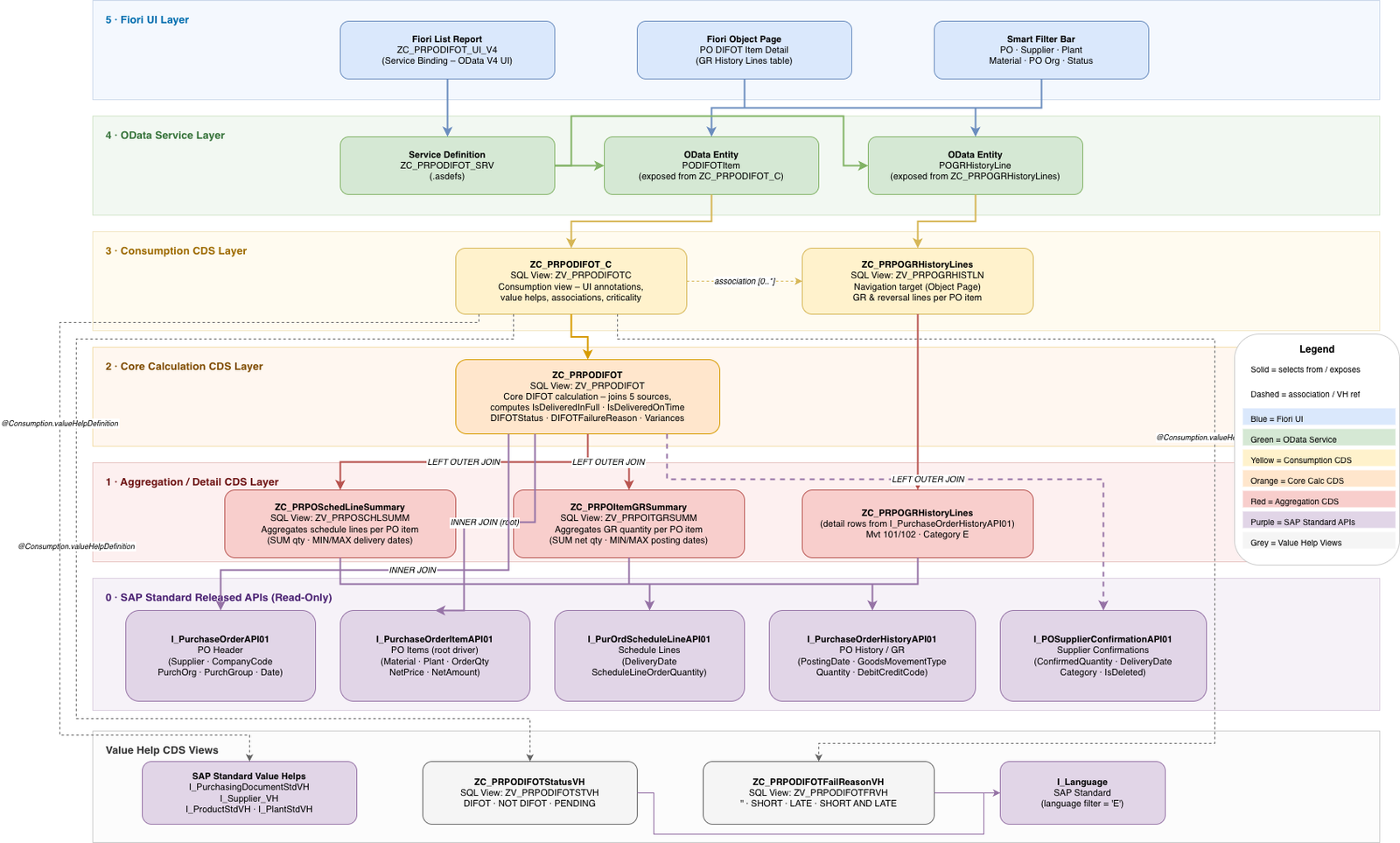
How the report works
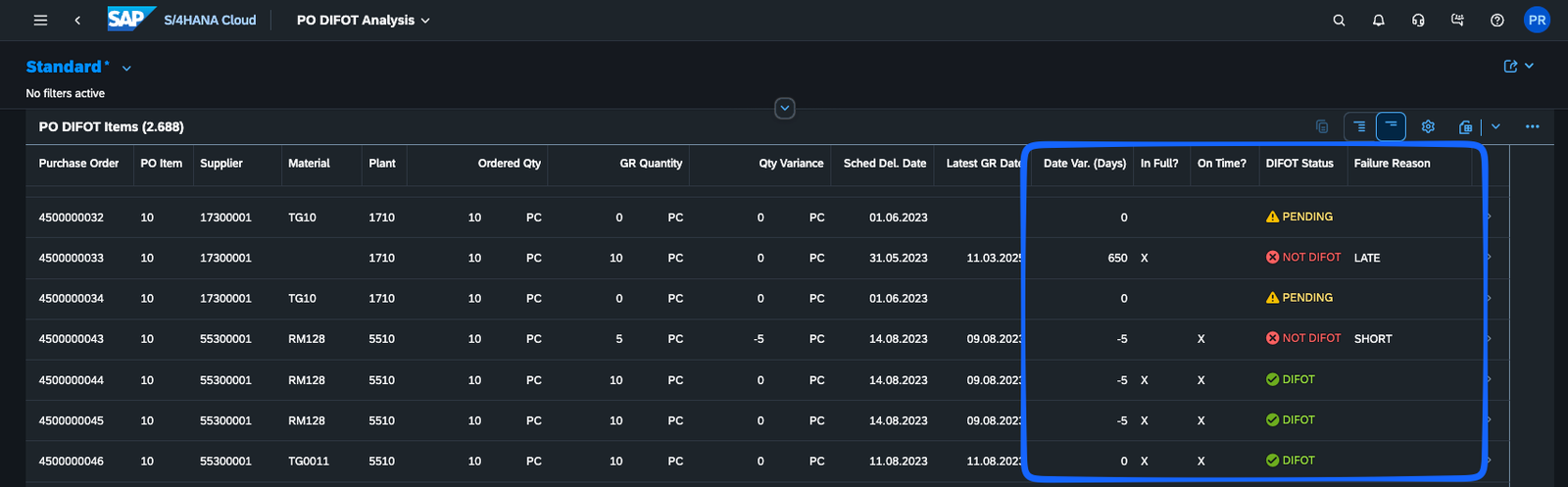
Once you launch the app, things should feel very familiar except for the specific fields that come with this report, which are:
| Field | Meaning |
|---|---|
| Qty Variance | GR Qty minus Ordered Qty — negative means short delivery |
| Latest GR Date | Date the most recent goods receipt was posted |
| Date Var. (Days) | Days between scheduled and actual — positive means late |
| In Full? | Tick if quantity met |
| On Time? | Tick if date met |
| DIFOT Status | DIFOT NOT DIFOT PENDING — colour-coded with icon |
| Failure Reason | SHORT / LATE / SHORT AND LATE / blank |

The DIFOT logic in brief
— Delivered In Full:
IsDeliveredInFull = ‘X’ when TotalGRQuantity >= OrderQuantity
— Delivered On Time:
IsDeliveredOnTime = ‘X’ when LatestGRPostingDate <= LatestSchedDelivDate
— Overall Status:
DIFOTStatus = ‘PENDING’ when no GR has been posted
DIFOTStatus = ‘DIFOT’ when both InFull AND OnTime
DIFOTStatus = ‘NOT DIFOT’ otherwise
— Failure Reason:
DIFOTFailureReason = ‘SHORT AND LATE’ when short AND late
DIFOTFailureReason = ‘SHORT’ when short only
DIFOTFailureReason = ‘LATE’ when late only
DIFOTFailureReason = ” when DIFOT or PENDING
Design decision — split deliveries: Where a PO item has multiple schedule lines, we compare against the latest scheduled delivery date. This avoids false DIFOT failures on split deliveries — a supplier who delivers the full quantity by the last scheduled line date is scored as on time.
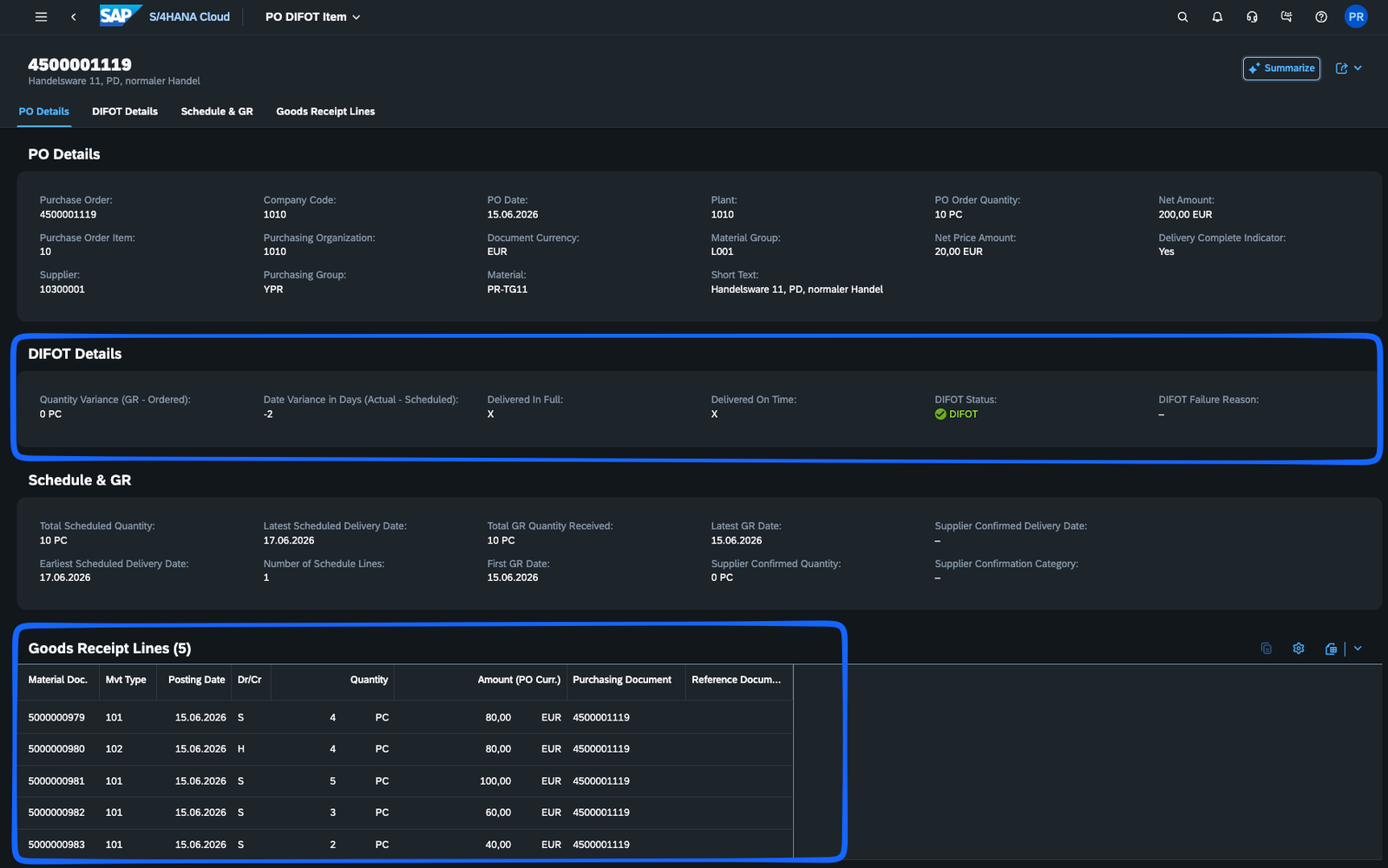
The Object Page drill-down
Clicking any row opens an Object Page with four tabs:
- PO Details — supplier, company code, purchasing org/group, material, plant, net price, etc.
- DIFOT Details — the four DIFOT fields and failure reason, displayed with criticality colouring
- Schedule & GR — scheduled quantities and dates, total GR quantity, first and latest GR dates, supplier confirmations
- Goods Receipt Lines — every individual GR and reversal movement (material document, movement type, posting date, quantity, amount), making it easy to trace exactly what arrived and when
Now it's your turn!
The Tools you will use to replicate this project
For detailed step by step instructions, and the code files, then head on over to Github!
SAP S/4HANA Cloud Public Edition
The target system. All custom CDS views, service definitions, and the deployed Fiori app live here. We used the Developer Extensibility model, which allows custom ABAP Cloud development on top of released SAP APIs.
ABAP Development Tools (ADT)
Eclipse-based IDE for creating and activating CDS Data Definitions, Service Definitions, Service Bindings, IAM Apps, and Business Catalogs in the S/4HANA Cloud back-end.
SAP Business Application Studio (BAS)
Change the color to match your brand or vision, add your logo, choose the perfect layout, modify menu settings, add animations and more.
SAP BTP (Business Technology Platform)
Provides the BAS environment and the BTP destination that allows BAS to connect to and deploy into the S/4HANA Cloud system.
ABAP CDS (Core Data Services)
The primary development artefact. CDS views define the data model, join logic, aggregations, DIFOT calculations, and all Fiori UI annotations — no classical ABAP report or BAdI required.
OData V4
The service protocol. A Service Definition and Service Binding expose the CDS model as an OData V4 endpoint that BAS and the deployed Fiori app consume.
SAP Fiori Elements
The UI framework. Because all UI behaviour is driven by CDS annotations, the Fiori Elements List Report and Object Page are generated automatically — no custom JavaScript or UI5 coding.
Released SAP APIs
All data access uses released, stable I_* CDS views (I_PurchaseOrderItemAPI01, I_PurchaseOrderHistoryAPI01, etc.) — no direct table access, ensuring upgrade compatibility.